
React Commands:
- Command to create a react app – npx create-react-app app-name
- Command to start a react app – npm start
React application Directory structure:
Following directory structure automatically gets created when you run the above command to create react app:
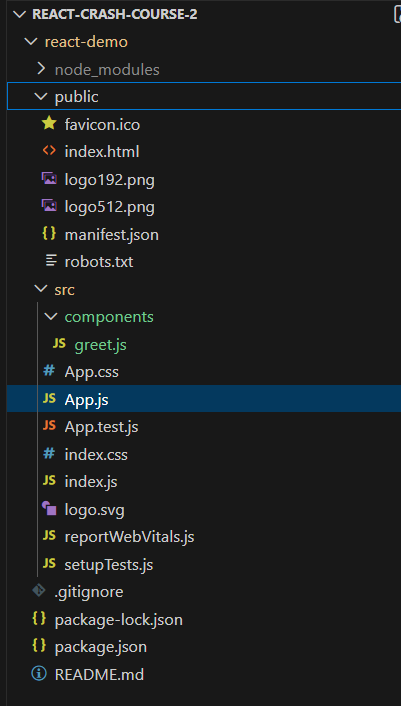
Entry point of the react app:
- Entry point of the react app is index.html.
- Inside the index.html there is a div element with id ‘root’
index.html :
…
…
<div id="root"></div>
….- The react app’s root component is rendered inside the above div tag with the following code written in index.js file
index.js:
…
…
import App from './App';

const root = ReactDOM.createRoot(document.getElementById('root'));
root.render(
  <React.StrictMode>
    <App />
  </React.StrictMode>
);

...
Types of react components
1. Functional components
2. Class Components
React functional component example
export const DemoComp = () => {
 return (
  <div>
     <p>hello world !</p>
 </div>
)
}
Note: React component name must start with uppercase letter
What is JSX
- React component returns JSX which is basically a react’s extension of javascript. It describes how the UI should look like.
- JSX returned by a component should contain only one wrapper element
Difference between JSX and html addtributes:
html JSX
class -> className (for CSS)
for -> htmlFor
onclick -> onClick
tabindex -> tabIndex
Passing data from parent to child component using react props:
parent.js :
import { ChildComp } from './child'

export const ParentComp = () => {
   return (
      <div>
        <ChildComp name = "Viresh"/>
      </div>
   )
}
child component (child.js)
export const ChildComp = (props) => {
   return(
       <div>
         <p>hello {props.name}</p>
       </div>
   )
}
Note :- Props are immutable in the child component i.e. their value can not be changed in the child component
Using Variables in a react component:
function Counter() {
  let count = 0;

  const increment = () => {
    count++;
    console.log(count);
  };

  return <button onClick={increment}>Increment</button>;
}
Using useState to Create State Variables in React
useState is a react hook that is used to maintain and update the state of a React component. When the state changes, the component re-renders with the updated value.
example:-
import { useState } from "react";

export const Message = () => {

    const [message, setMessage] = useState('Welcome vistor'); //The useState takes the initial value of the state variable as argument and returns an array containing the state value and a setter function to update the state value in future

    return (
       <div>
          <h1>{message}</h1>
          <button onClick = {() => setMessage('thanks for subscribing')}>subscribe</button>
        </div>
    )
}
Difference between state variables and regular variables
Regular variables:
- Reset on every render ❌
- Do not trigger re-renders ❌
State variables (useState):
- Persist across renders ✅
- Trigger re-render on update ✅
Use cases of regular variables and useState
| Use case | Regular variable | useState |
|---|---|---|
| Temporary calculations | ✅ | ❌ |
| Flags used only inside a function | ✅ | ❌ |
| Data shown in UI | ❌ | ✅ |
| Data that changes over time | ❌ | ✅ |
| Needs to survive re-render | ❌ | ✅ |
Event handling in react
export const EventHandlingDemo = ( ) => {

   const handleButtonClick = (event, name) => {
     console.log(event);
     alert('button clicked')
     if(name){
        alert('hello '+name)
     }
   }

    return (
        <div>
            <h2>Event Handling demo</h2>
            {/* approach 1 of calling function. It can be used when no argument need to be sent to the function: */}
            <div>
                <button onClick = {handleButtonClick}>click button</button>
            </div>
            {/* approach 2 of calling function. It can be used when some argument needs to be sent to the function: */}
            <div>
                <button onClick = {(event) => handleButtonClick(event, 'john')}>button 2</button>
            </div>
        </div>
    )
}
Call a parent component’s function from it’s child component
parent.js
import { Child } from './child'

export const Parent = () => {
    const greetParent = (event,name) => {
        alert('hello papa');
        if(name){
            alert(`hello papa from ${name}`);
        }
    }

    return (
        // we are passing the function greetParent as prop to the child component
        <Child greetParent={greetParent}></Child>
    )
}
child.js
export const Child = (props) => {

    return (
        <div>
            <div>
                <button onClick = {props.greetParent}>Greet parent</button>
            </div>
            <div>
                <button onClick = {(event) => props.greetParent(event,'Viresh')}>Greet parent with child name</button>
            </div>
        </div>
    )
}
Conditional rendering in React
Approach 1: using ternary operator –
export const ConditionalRenderingDemo = () => {
    let isLoggedin = true;
    return (
        <div>
            <h2>Valentine's gifting platform</h2>
            <div>Welcome {isLoggedin ? <b>Viresh</b> : <b>Guest</b>}</div>
        </div>
    )
}
Approach 2 : using if else statements
export const ConditionalRenderingDemo2 = () => {
    let isLoggedin = true;
    let welcomeMessage = '';
    if(isLoggedin){
        welcomeMessage = <b>Welcome Toshika</b>
    }else{
      welcomeMessage = <b>Welcome Guest</b>
    }
    return (
        <div>
            <h2>Valentine's gifting platform</h2>
            <div>{welcomeMessage}</div>
        </div>
    )
}
Note: Note: if/else can’t be used inside the return function , so all the if else logic needs to be outside of return function
Rendering list of items in React
export const NameList = () => {
    const names = ['Viresh', 'Toshika', 'Vandana']
    return (
        <div>
            {
                names.map((name) => {
                    return <div key="name">{name}</div>
                })
            }
        </div>
    )
}